Password Generator
Generate strong random passwords with custom options. Every character comes from your browser's cryptographically secure random source, and everything runs locally: nothing is ever uploaded.
How to use
- Drag the "Password length" slider to set the length (4–64); the number beside it updates as you drag.
- Tick the character sets you want: uppercase, lowercase, digits or symbols. If you plan to type the password by hand, also enable "Exclude ambiguous characters".
- Click "Generate Password" and a random password appears instantly, together with a strength estimate based on length and character variety.
- Click "Copy" to put the password on your clipboard and paste it where you need it. Use "Clear" to remove the current result and start over.
FAQ
Are the generated passwords truly random?
What does "Exclude ambiguous characters" do?
How long should a password be?
Are my generated passwords stored anywhere?
Screenshots
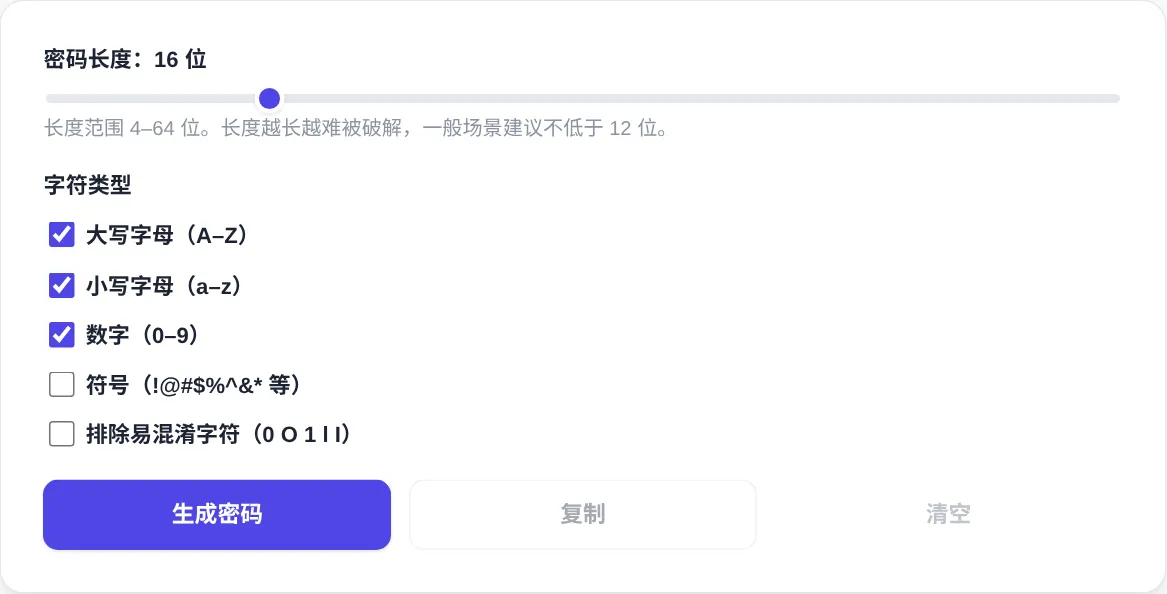
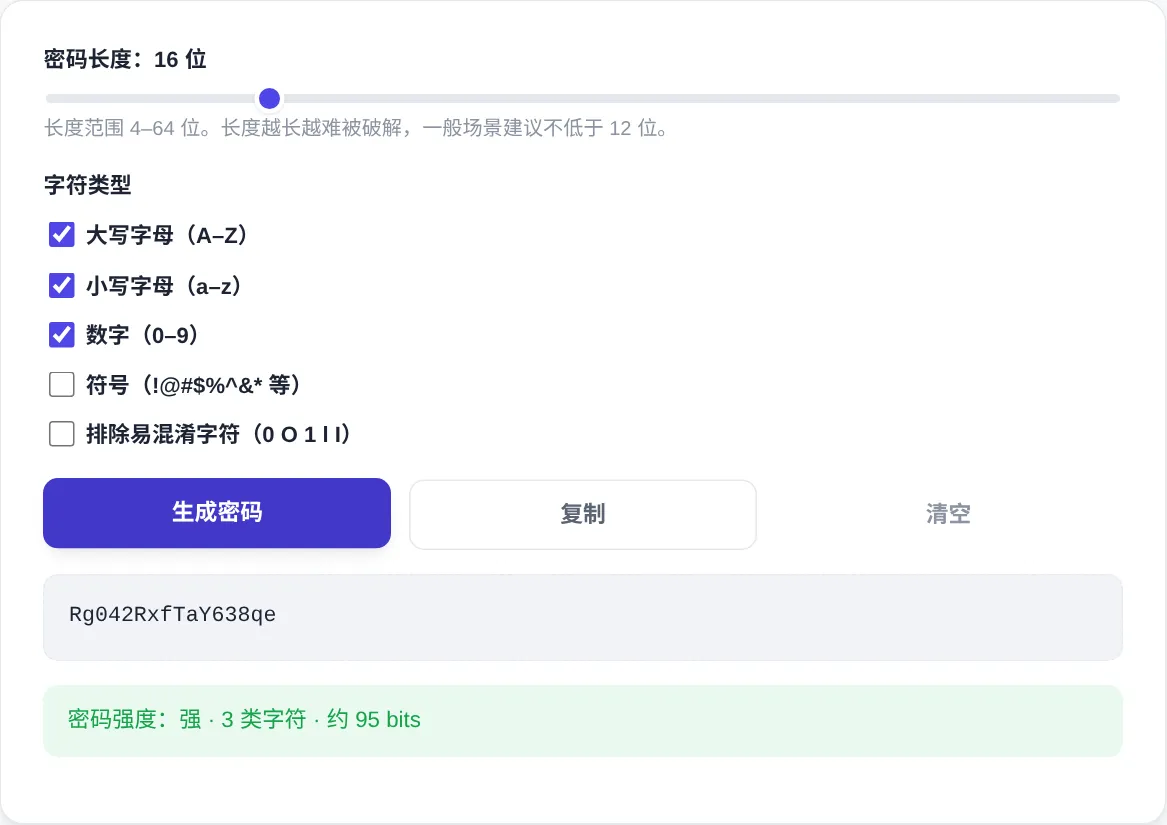
How to use
- Set the length
Drag the Password length slider between 4 and 64; the number updates as you drag. Aim for at least 12 characters on everyday accounts and 16 or more for sensitive ones.
- Choose character sets
Uppercase, lowercase and digits are on by default. Tick Symbols for the strongest mix, or leave it off for sites that reject special characters.
- Exclude ambiguous characters
If you will type the password by hand or read it aloud, enable Exclude ambiguous characters. It removes 0, O, 1, l and I, which look alike in many fonts.
- Generate and check strength
Click Generate Password for an instant result plus a strength estimate based on length and character variety. If the estimate is weak, add length and regenerate.
- Copy and store it safely
Press Copy to move the password into your clipboard, then save it in a reputable password manager. Closing the page erases the result for good.
About this tool
This generator draws characters from crypto.getRandomValues(), the browser's cryptographically secure random source, never a predictable pseudo-random algorithm. Every password is created locally, and nothing is uploaded. Strength comes down to entropy: each extra character multiplies the search space, and a 16-character password mixing four sets already resists brute force.
Use it when registering new accounts, rotating old credentials, or setting up Wi-Fi and database passwords. Unlike a phrase you invent yourself, a random password contains no birthdays, names, keyboard walks or reused patterns. Pair it with a reputable password manager, and strong no longer has to conflict with memorable. Generate a fresh one for every account so a single leak never cascades.
How it works
Entropy is the ruler here. Each character contributes the log2 of the alphabet size: about 4.7 bits for lowercase only, about 6.6 bits across the 94 printable ASCII characters. A 16-character mixed password spans a search space beyond 2^100. At a trillion guesses per second, exhausting it takes hundreds of millions of years. A 20-character password at the same mix clears 130 bits, a space no realistic attack can search. One extra character always buys more resistance than any cleverer substitution scheme.
Math.random() is a seeded pseudo-random generator. Recover its internal state and every future output becomes predictable, which disqualifies it for secrets. crypto.getRandomValues() draws from the operating system's entropy pool instead, with cryptographic strength guaranteed by the kernel. The stakes are real: a 2008 Debian packaging mistake weakened OpenSSL's randomness, and keys generated on affected machines could be derived within hours. The quality of the random source matters as much as length or variety, so check it first when you pick a generator.
When to use it
- Registering an important account
The moment you create a banking, email or cloud account, generate a password of 16+ characters. Paste it in and save it straight into your manager. Never reuse an old one or just append a character.
- Infrastructure credentials
Wi-Fi passphrases, database passwords and API gateway secrets suit a local generator, because nothing leaves the device. Exclude ambiguous characters keeps the string readable when it is copied into runbooks by hand.
- Rotating after a breach
When a service reports a leak, regenerate passwords for every account that shared the old one and switch on two-factor authentication. A full-length random replacement beats tweaking a single character.
Tips & tricks
- Length beats complexity: a 16-character password with digits and symbols outclasses a 12-character one built from lowercase only.
- Some legacy forms reject symbols. If validation fails, untick Symbols and generate again rather than hand-editing the password.
- Results live only in this page's memory and vanish when you close it, so copy and store the password immediately.
Things to watch
- The clipboard is not a vault
Clipboard managers and other apps on shared machines can read what you copy. Paste, then clear the clipboard immediately, or let your password manager's autofill do the typing instead.
- Legacy systems reject symbols
Older forms whitelist punctuation and will bounce a symbol-bearing password. Untick Symbols and regenerate instead of hand-editing one or two characters, which quietly wrecks the uniform randomness.
- The strength label has blind spots
The estimate only knows length and character variety, not reuse or leaked-dump appearances. A strong label on a reused password still ends in an account takeover.