SQL Formatter
Pretty print SQL with a hand built tokenizer, clause breaks and safe comments
How to use
- Paste SQL into the left pane. The right pane refreshes live, and the Format button reflows immediately.
- Keep uppercase keywords ticked, or untick it to preserve the original casing.
- Pick 2 or 4 spaces. Clause breaks and nested indents follow the chosen width.
- Separate statements with semicolons. The output splits into blocks with a blank line between them.
- Copy the result and paste it back into your editor or document.
Formatting rules
Which clauses get their own line?
Are strings and comments modified?
What happens with syntax it does not know?
Does my SQL leave the browser?
Common questions
Which words does the case toggle touch?
Why do some commas break lines and others not?
Can it format stored procedures or dialect syntax?
Does formatting change the query result?
Screenshots

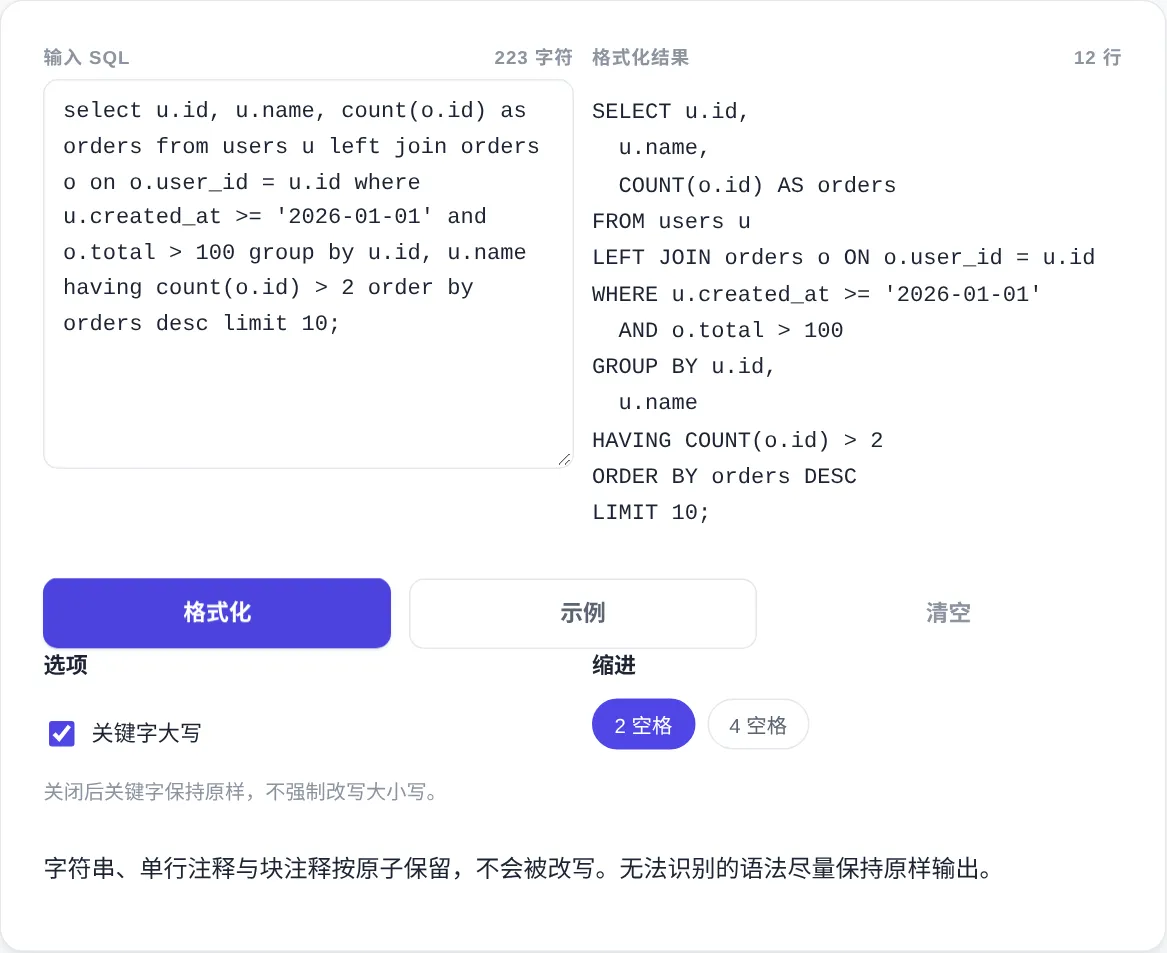
How to use
- Paste the SQL
Drop statements into the left pane and the right pane updates live. The Format button reflows everything immediately on demand.
- Pick casing and indent
Uppercase keywords is on by default, untick it to keep original casing. Indent comes in 2 or 4 spaces, and subqueries follow the width.
- Split on semicolons
Separate statements with semicolons and the output forms blocks with blank lines between them, so long scripts show their shape.
- Copy the result
Copy the formatted statements and paste them back into your editor. The output matches the preview character for character.
About this tool
Formatted SQL pays off the moment more than one person reads it. Consistent clause breaks and indents make reviews faster and slow query diagnosis clearer, because the WHERE tree and the join chain actually show. SQL is a free form language: whitespace never changes execution, yet readability varies wildly. Common conventions include one line per main clause, indented subqueries, and top level commas breaking lines in select lists. Uppercase keywords then separate reserved words from table and column names. None of it is an official standard, so what matters is that a team stays consistent, and this tool provides a general baseline.
This tool works in two passes. A hand written tokenizer first cuts the input into atoms: strings, comments, numbers and identifiers each become single blocks. Tokenizing is what keeps the semicolon inside a string like 'paid;refund' from splitting a statement, and keywords inside comments are never uppercased. The layout pass then moves whitespace only, adds nothing and deletes nothing, and syntax it cannot classify passes through untouched. Everything runs in the browser, statements never leave the device, and the input plus options persist only in this browser.
How it works
The tokenizer takes a clear stance on tricky cases. Two adjacent single quotes inside a string are an escaped quote. Double quotes and backticks wrap identifiers, and square brackets mark T SQL style identifiers, all preserved byte for byte. Comments come in two shapes: a double dash to the end of the line, and a slash star block that may span lines. A semicolon counts as a statement boundary only outside strings and comments. Numbers support decimals, exponents and hex literals, and multi character operators match before single characters so the not equal sign stays whole.
Layout rules stay deliberately conservative. Main clauses start lines, join variants get their own lines, subqueries indent inside their parentheses, and AND plus OR break inside WHERE, HAVING and ON. CASE expressions break on WHEN and ELSE, staying inline when nested inside function arguments. Commas break only in top level lists, never inside function calls. Procedural blocks and dialect specific syntax are not deeply reflowed and pass through as ordinary symbols. The tool never validates grammar, so an error in survives formatting, and a quick review before running is still on you.
When to use it
- Diagnosing slow queries
Queries pulled from logs usually arrive as one endless line. Format first, read the plan second, and the WHERE tree plus the join chain become visible. Pointing at the redundant subquery or the missing condition is far easier to explain to colleagues afterwards.
- Tidying report scripts
Report scripts often chain several queries together. Formatting by semicolon turns them into labeled blocks, each with a clear job, and copying a single block for a test run gets easy. Comments stay in place, so the purpose notes survive too.
- Aligning a team style
Adopt the output as the baseline: uppercase keywords, one clause per line, two space indents. Reviews stop arguing about formatting, diffs hold only real logic changes, and reverting a change lines up cleanly. Newcomers also skip the cleanup pass when they inherit old scripts.
Tips & tricks
- Format before tuning a slow query, so the condition levels are clear before you add indexes or rewrite.
- To keep a team's existing style, switch off uppercase keywords and use only the line breaks and indents.
- Formatting never validates syntax. When execution fails, check the statement itself before blaming the tool.
Things to watch
- Expecting it to fix syntax
The tool rearranges whitespace only. A missing comma or an unbalanced parenthesis still fails after formatting, since nothing validates the grammar and nothing gets rewritten. Treating the formatter as a linter wastes debugging time, so leave validation to real runs.
- Uppercase surprises
Casing changes touch only words in the built in keyword list, while table and column names pass through. If a column is named like a reserved word, it gets uppercased anyway, so quote it or rename it to avoid ambiguity.
- Forcing dialect syntax
Stored procedures, window function extensions and vendor specific syntax may not fit the generic rules. When a reformatted block looks suspicious, revert to the original and tidy it by hand. Keep a copy of the source statement so comparing the two stays easy.