Timestamp Converter
Convert between Unix timestamp and date-time online with auto-detection of seconds and milliseconds. See the live current timestamp plus local, UTC and ISO 8601 formats: all computed locally.
How to use
- The top of the widget shows the current Unix timestamp: both seconds and milliseconds refresh every second.
- Enter a 10-digit (seconds) or 13-digit (milliseconds) timestamp under "Timestamp → Date & Time" to see its local time, UTC time, ISO 8601 value and weekday instantly.
- If the unit is unusual, keep "Auto" or pick "Seconds"/"Milliseconds" manually; the one-click "Use now" buttons insert the current time for you.
- Under "Date & Time → Timestamp", pick or type a local date-time with the picker and the matching second and millisecond timestamps appear in real time.
- When you need a timestamp for your code or an API, just select the value and copy it.
FAQ
How do I tell seconds and milliseconds apart?
Which timezone is used for the conversion?
Are negative timestamps before 1970 supported?
Is there a limit to the timestamp range?
Screenshots
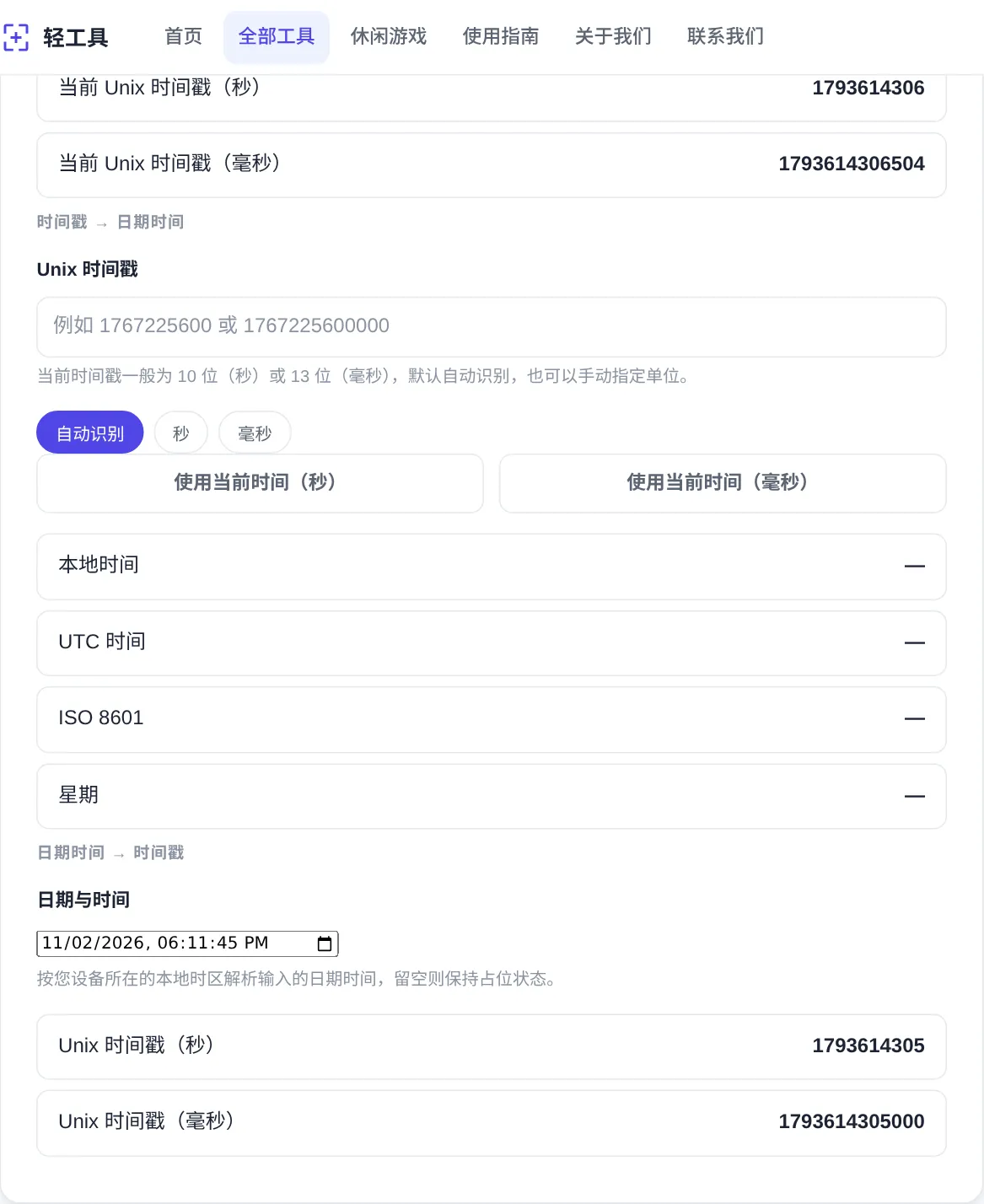
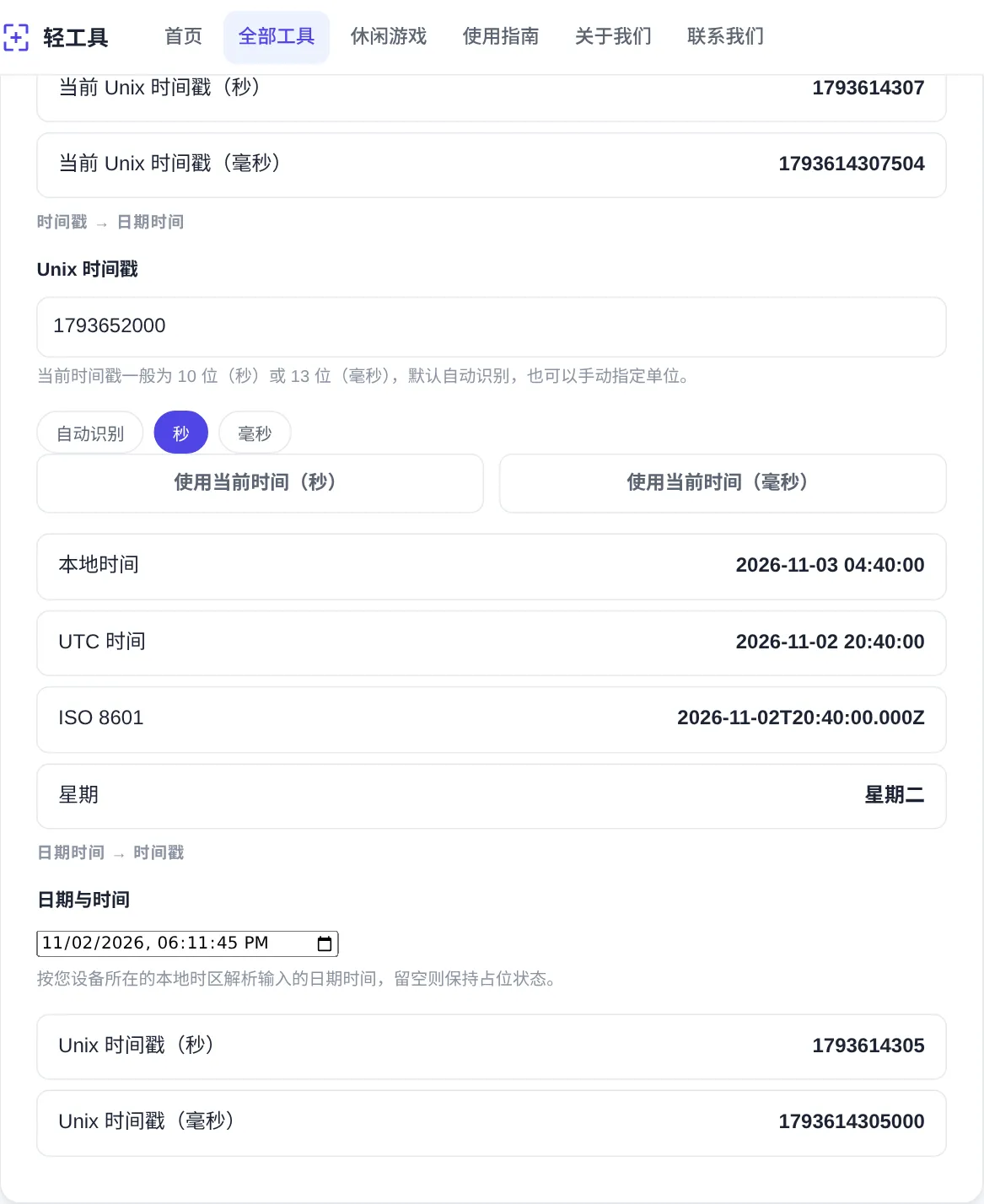
How to use
- Read the live timestamp
The widget top shows the current Unix timestamp in both seconds and milliseconds. It refreshes every second, so a fresh value for logs or tests is always at hand.
- Convert a timestamp to date
Enter a 10-digit seconds value or a 13-digit milliseconds value. Local time, UTC time, ISO 8601 and the weekday appear at once in the result rows.
- Control the unit detection
Auto mode judges the unit by magnitude. When a value is ambiguous, force Seconds or Milliseconds with the chips, or use the one-click now buttons.
- Turn a date into timestamp
Pick a local date and time in the lower picker. The matching seconds and milliseconds timestamps update in real time, handy for building test fixtures.
- Mind timezones and limits
The date-time picker is interpreted in your device timezone, with the UTC row as reference. Negative values cover dates before 1970, and out-of-range numbers are reported as invalid.
About this tool
A Unix timestamp counts seconds or milliseconds elapsed since 1970-01-01 UTC, and it is how databases, logs and APIs record time. Machines handle it well; people cannot read a date from it. This converter works both ways: type a timestamp and instantly see local time, UTC, ISO 8601 and the weekday. Or pick a date and get the exact timestamps back, with automatic unit detection for the common 10-digit and 13-digit forms.
Typical uses: correlating log entries, checking why a cache expired, reviewing cron schedules. It also translates an example timestamp in API documentation into a real date. QA engineers generate precise timestamps for test cases; analysts line up events across systems that store time differently. The local and UTC rows are shown together, so cross-timezone conversations stop producing off-by-hours mistakes. Negative values also cover historical dates before 1970.
How it works
Strictly speaking, Unix time ignores leap seconds. Every calendar day is counted as 86400 seconds, yet the real world occasionally inserts one. The leap seconds of 2015 and late 2016 left some services printing a duplicated or repeated second at midnight. A slow drift between timestamps and atomic time is therefore built in, and a millisecond-precise value is not guaranteed to match the physical instant. Ledgers, auctions and cross-system reconciliation sit in that gap and need their own time-sync discipline.
2038-01-19 03:14:07 UTC ends the 32-bit era. The signed 32-bit maximum 2147483647 runs out at that moment, and devices still counting seconds in 32 bits wrap back to 1901. Modern JavaScript stores milliseconds in a double-precision float instead, and the 53-bit mantissa reaches far beyond any human timescale. That is where the 13-digit millisecond form comes from. ISO 8601 orders fields from largest to smallest, separates date and time with T, and marks zero UTC offset with Z. Sorting its strings sorts the moments, which makes it the safest format for cross-timezone communication.
When to use it
- Rebuilding a log timeline
During incident triage, paste each timestamp from the logs, convert, and lay the events out in one timezone. Sequence and gaps become obvious, and records that appear to travel backwards in time stand out at once.
- Checking token and cache expiry
Token expiry times and cache deadlines usually arrive as millisecond timestamps. Paste one in and the remaining lifetime is visible at once. Check it before writing renewal logic, so the threshold you pick matches reality.
- Generating edge-case test data
Testing cron jobs or countdowns often needs special values: 0 for the epoch, negative timestamps, or exact hour boundaries. Pick them in the date picker and copy the numbers into test cases, faster than computing them inside code.
Tips & tricks
- Digit count is the first clue: current time is 10 digits in seconds and 13 in milliseconds. Auto treats values at or above 10^12 as milliseconds.
- Results use your device timezone; the UTC row is the neutral reference. When coordinating across countries, quote the ISO 8601 value to avoid ambiguity.
- Negative timestamps work: -86400 is the last day of 1969. The supported range is roughly plus or minus 270,000 years.
Things to watch
- Milliseconds where seconds are expected
A 13-digit millisecond value handed to a seconds-only API lands about fifty thousand years in the future. This usually happens when a JavaScript-generated timestamp goes straight into a backend seconds field. Confirm the unit before writing.
- The duplicated hour of DST
In regions with daylight saving time, the autumn rollback makes one local time occur twice a year. The two occurrences map to different timestamps, so sorting by local time strings scrambles event order. Persist and sort by timestamp instead.
- Zero values near 1970
Negative timestamps are legal and just mean dates before the epoch, yet many languages truncate them to zero or throw. A dataset suddenly full of 1970-01-01 almost always means upstream code swallowed nulls. Question the source before blaming the converter.